
Clicker 6 is a software program that supports written communication. It has a variety of tools to assist
students in developing their writing and increasing their fluency in expressing their thoughts and ideas.
Clicker 6 uses word banks and a word predictor which helps students expand their vocabulary and grow
their confidence. Additionally, it increases independence in proofreading and editing. The assistive
features can be adjusted based on individual writing levels. Students are able to incorporate visual and
audio elements into their writing which allows for more creative projects. The range of features along with
the ability to select which features to use make this a versatile tool.
students in developing their writing and increasing their fluency in expressing their thoughts and ideas.
Clicker 6 uses word banks and a word predictor which helps students expand their vocabulary and grow
their confidence. Additionally, it increases independence in proofreading and editing. The assistive
features can be adjusted based on individual writing levels. Students are able to incorporate visual and
audio elements into their writing which allows for more creative projects. The range of features along with
the ability to select which features to use make this a versatile tool.
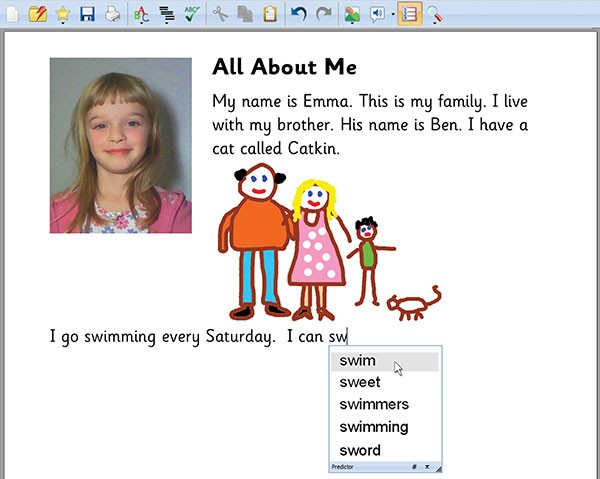
Below are some pictures of the various ways the software can be used.

Evaluation:
ENGAGEMENT
| |
| X |
The app gives a good first impression (graphics, ease of use, etc.)
|
| X |
The app is intuitive
|
| X |
The app opens up new ways to learn
|
DEVELOPMENTAL APPROPRIATENESS
| |
| X |
The user interface is age appropriate
|
| X |
The subject matter appeals to the intended audience
|
| X |
The design matter appeals to the intended audience
|
INSTRUCTIONAL DESIGN
| |
| X |
The app aligns with your learning goals for your students
|
| X |
The app has a specific purpose
|
| X |
The app builds on skills and guides the student
|
| X |
The app offers personalized or adaptive features that are based on a student’s skill level
|
There are relevant opportunities for feedback, assessment, and reflection
| |
MOTIVATION
| |
| X |
The learning content in the app is the right level for your students
|
Gaming principles are used
| |
The methods used to motivate align with your learning goals
| |
| X |
The motivational potential exceeds the potential for distraction
|
ACCESSIBILITY
| |
| X |
The app includes a range of levels for a variety of users with differing skill levels
|
| X |
The app supports multiple learning modalities
|
OTHER
| |
Intended Age Group/Audience: elementary; special education
| |
References:
Clicker 6: An Introduction. (n.d.). Retrieved from http://www.spectronics.com.au/online/resource/clicker-6-an-introduction/
EduGAINS. (n.d.). Retrieved from http://www.edugains.ca/newsite/digitalResources/clicker6.html
Clicker 6: An Introduction. (n.d.). Retrieved from http://www.spectronics.com.au/online/resource/clicker-6-an-introduction/
Comments
Post a Comment